Mozilla Script: A Classic Copper Script with a Modern Edge
The Perfect Blend of Nostalgia and Contemporary Style
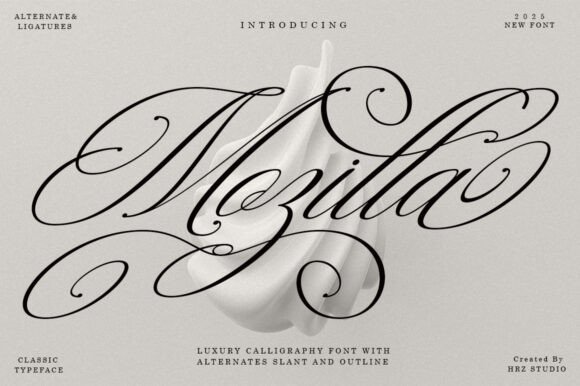
When you're searching for a typeface that feels both timeless and fresh, it's easy to feel stuck between overly traditional scripts and ultra-modern sans serifs. Mozilla Script is a premium font that bridges that gap beautifully. It’s a classic decorative copper script, but it’s been reimagined with a modern touch, giving you the elegance of traditional calligraphy without the stuffiness. The high detail in every letterform is designed to convey stylish sophistication, making it a standout creative font for projects that need a touch of class.
What makes Mozilla Script so appealing is its personality. The typeface is smooth, clean, and feminine, with a sensual, glamorous quality that feels effortlessly chic. It’s simple in its overall effect, yet rich in its details. The many fancy letter connections create a flowing rhythm that’s surprisingly very easy to read, a common challenge with many script fonts. This balance of beauty and legibility is what sets it apart. It’s a display font that doesn’t sacrifice clarity for style, making it a practical choice for a wide range of applications.
Where Mozilla Script Truly Shines: Real-World Applications
Understanding a font's personality is one thing; knowing where to use it is another. Mozilla Script is a versatile design asset, but it excels in contexts where elegance and a personal touch are paramount. Think about projects that need to make a memorable first impression or convey a sense of luxury and care.
For brand identity, this font is a natural fit for businesses in the beauty, fashion, wedding, and gourmet food industries. Imagine it on a logo design for a boutique hotel, a high-end cosmetics line, or a artisanal bakery. It instantly communicates a brand that values aesthetics and quality. In packaging design, it can elevate a product from ordinary to premium. A label for a specialty coffee, a box for handmade chocolates, or the branding for a candle line would all benefit from its sophisticated charm.
In the world of editorial design and publishing, Mozilla Script is a powerful tool. It’s perfect for book covers, especially for romance novels, poetry collections, or lifestyle books. For magazines, it works beautifully for section headers, pull quotes, or the masthead of a fashion or interior design publication. It adds a layer of visual hierarchy and artistic flair that draws the reader's eye.
For personal and event-based projects, the applications are endless. Wedding invitations, save-the-date cards, and thank-you notes are classic uses, but also consider menu designs for a formal dinner, branding for a personal blog, or social media graphics for a lifestyle influencer. Its elegance translates well to both print and digital formats, though careful attention to size is key for web design to maintain its readability.
Practical Guidance for Using Mozilla Script Effectively
Choosing a font is a strategic decision. Here’s how to evaluate and implement Mozilla Script in your projects.
Evaluate the Project Fit: First, consider your audience and message. Is your project aiming for a formal, luxurious, romantic, or artistic feel? If the answer is yes, Mozilla Script is a strong candidate. It’s less suited for corporate reports, tech startups, or children's products where a more neutral sans serif font or a playful handwritten font might be appropriate.
Test Font Pairings: A script font rarely works well alone for body text. The key to a professional layout is pairing it with a complementary typeface. For a timeless and readable combination, pair Mozilla Script with a clean, geometric sans serif font. This creates a beautiful contrast that highlights the script's elegance while ensuring the main text is easy to read. Alternatively, pairing it with a classic, old-style serif font can create a more traditional and cohesive aesthetic.
Review Included Styles: Mozilla Script often comes with valuable style alternatives. Look for features like Slant and Outline versions. The Slant style can add dynamic energy, while the Outline version is perfect for creating layered effects or a more delicate look. These alternatives for many letters give you flexibility to customize the typography for different applications, ensuring your brand identity remains consistent yet adaptable.
Readability Considerations: As a display font, use Mozilla Script for headlines, logos, and short phrases. Avoid setting long paragraphs of body copy in it, as the intricate connections can reduce reading speed. Always test your designs at the intended size, especially for web design, to ensure the details remain clear and legible on various screens.
Commercial Licensing: If you’re using the font for a client project, a product you sell, or any commercial endeavor, verify the licensing. Most premium fonts like Mozilla Script require a commercial license. This is a critical step to protect your work and respect the font designer's craft. Ensure the license covers your specific use case, whether it's for digital products, print materials, or embedded in a logo.
Incorporating a font like Mozilla Script into your toolkit is about more than just aesthetics; it's about choosing a typeface that enhances communication, builds recognition, and resonates with your audience. By understanding its strengths and applying it thoughtfully, you can leverage its elegant personality to create designs that are both beautiful and effective.